

How to Connect Knoon Agents to Gmail SMTP for Sending Emails

Imagine that your Knoon agent could send emails on your behalf, welcome messages, notifications, confirmations, follow-ups, or even personalised responses directly from your own Gmail account. With SMTP tool integration, that becomes possible. Instead of relying on external mail services or manual typing, your AI agent can securely send emails using your personal Gmail credentials, all within your automated workflow.
In this guide, we’ll walk through what SMTP is, why it matters, and how to connect your Gmail SMTP settings to Knoon so your agents can start sending emails instantly.
What is Simple Mail Transfer Protocol (SMTP)?
SMTP (Simple Mail Transfer Protocol) is the standard protocol for sending emails from an email client or application. By connecting Gmail SMTP to Knoon, you enable your AI agent to:
- Send custom emails directly from your Gmail address
- Automate notifications and follow-ups
- Respond to customer support inquiries
- Trigger email actions based on user prompts
This empowers your agent to take proactive action, not just respond to inquiries, but also communicate on your behalf.
Gmail SMTP Requirements
To use Gmail SMTP, you need:
- A personal Gmail account
- App password enabled (required if 2FA is turned on)
- Gmail SMTP server details:
- SMTP Server: smtp.gmail.com
- Port: 465 (SSL)
Once you have your Gmail SMTP password (app password), you’re ready to connect it to Knoon.
How to Setup SMTP in Knoon
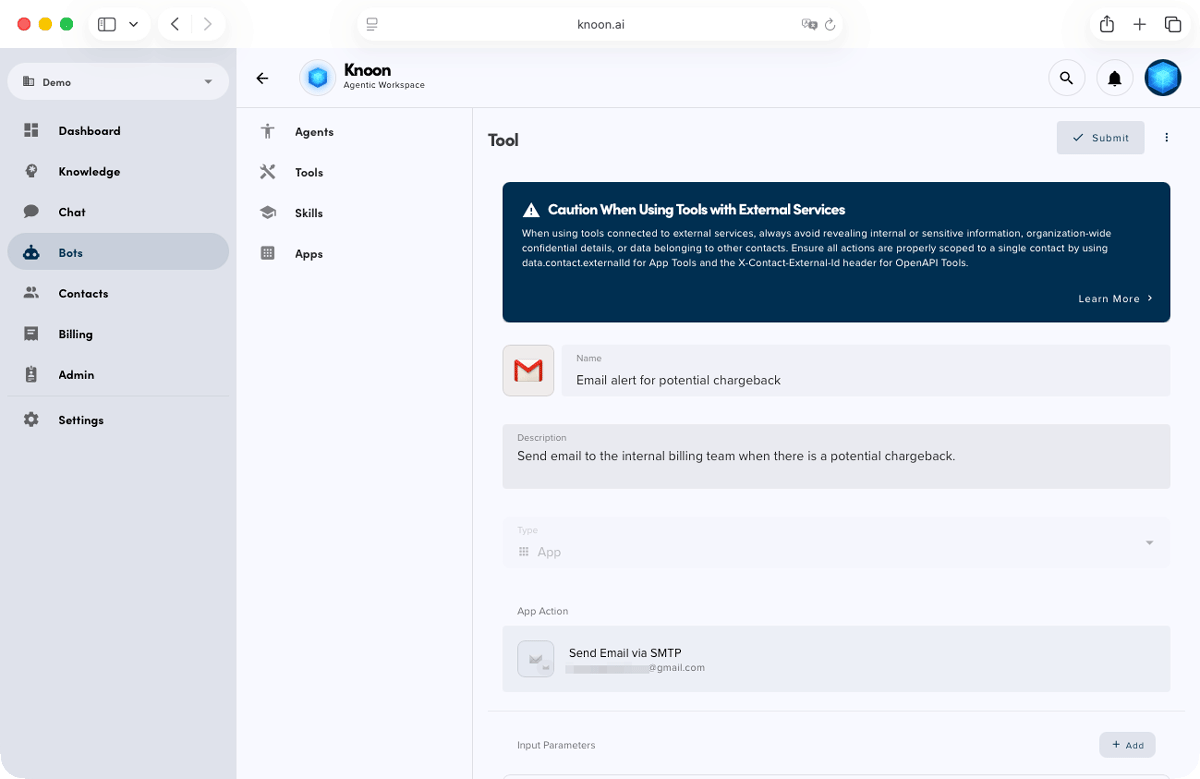
- Navigate to Bots → Tools
- Click Create
- Give your tool a name such as “Gmail SMTP Sender”
- Add a description of what the tool does e.g. Send emails through Gmail using SMTP
- Choose App as the tool type
- Select An App Action → SMTP
Knoon will guide you through the SMTP setup. Simply fill in the following fields:
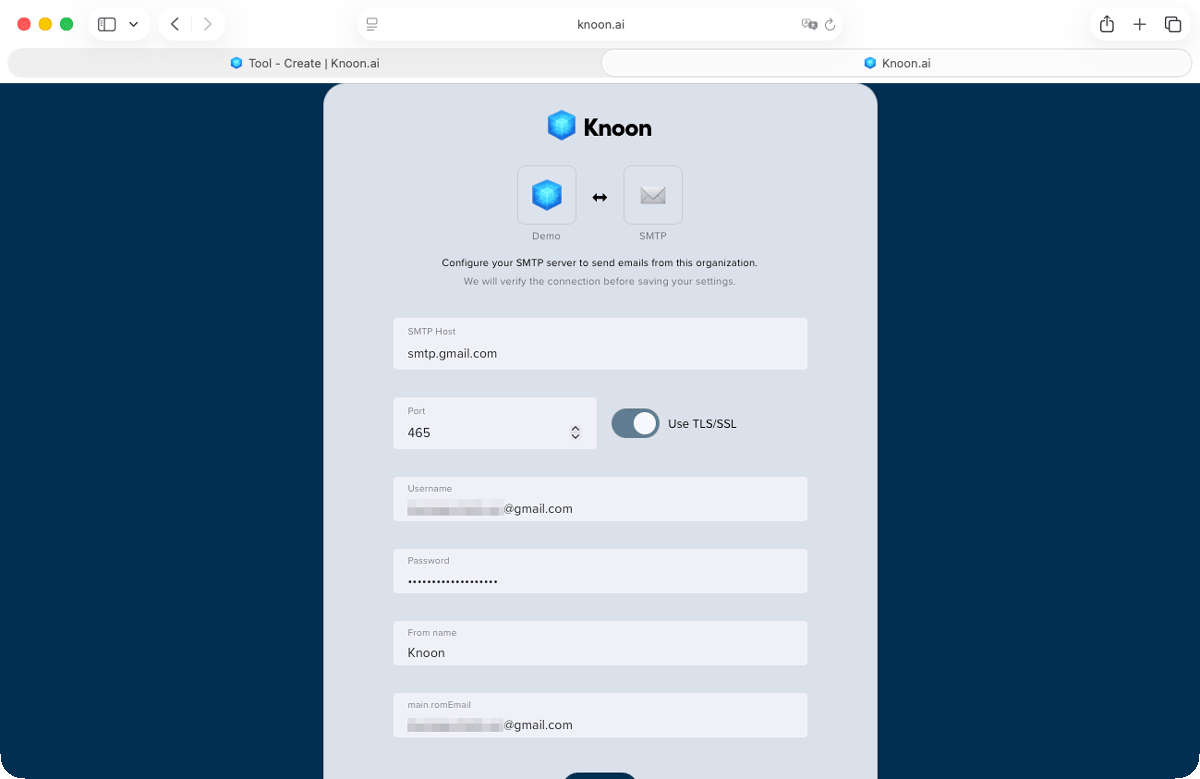
- SMTP Host: smtp.gmail.com
- Port: 465 (Enable TLS/SSL)
- Username: Gmail address
- Password: Gmail App Password (❗️See callout below)
- Sender Name: How you want your emails to appear
- Sender Email: The email address you want to send from
Once done, you can now configure the email template.
In this example, we are creating a chargeback alert send to the internal billing team via email. The configurations are:
from
By default, it is from the SMTP of the app.
to
The email address of the internal billing team.
subject
[‼️] Potential chargeback initiated by {{data.contact.displayName}} ({{data.contact.email}})
textBody
Hi Internal Billing Team,
{{inputPara.email-body}}
Best Regards, Knoon AI
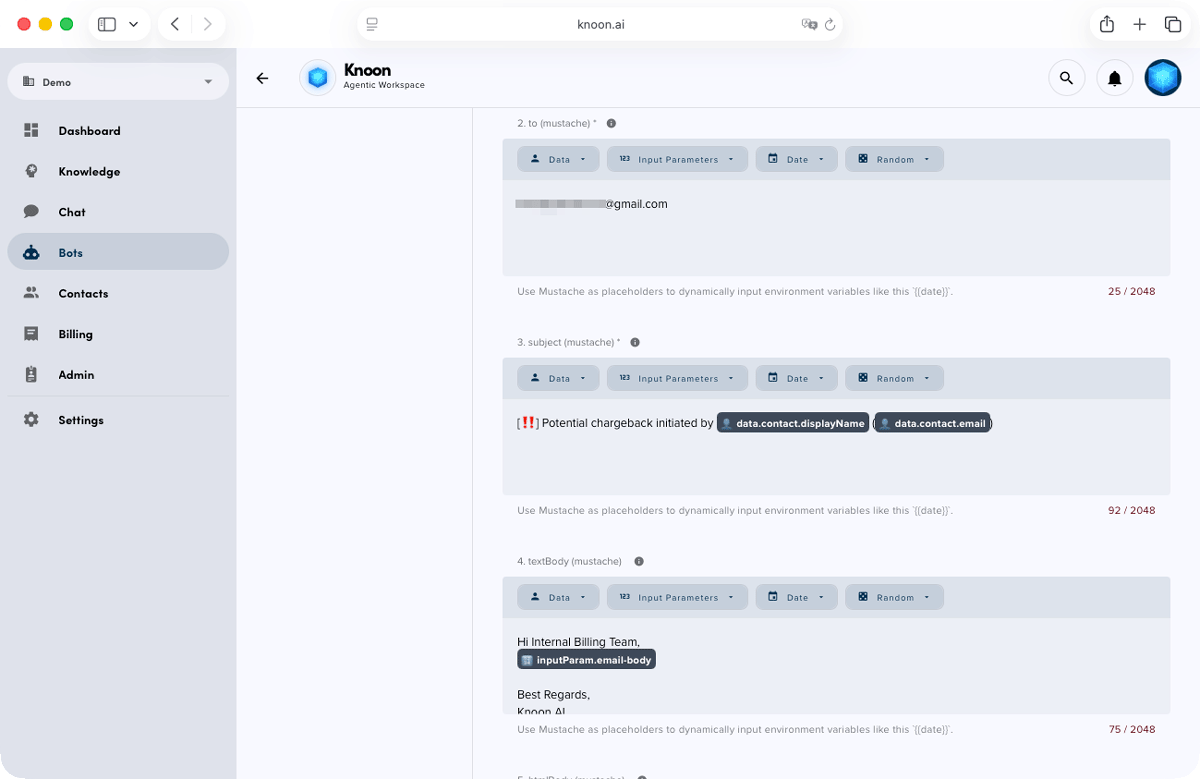
Knoon agents can capture these inputs naturally through user conversations. With these parameters, the agent gathers all necessary details and automatically drafts the email before sending it to the recipient.
Attach the SMTP Tool to Your Agent
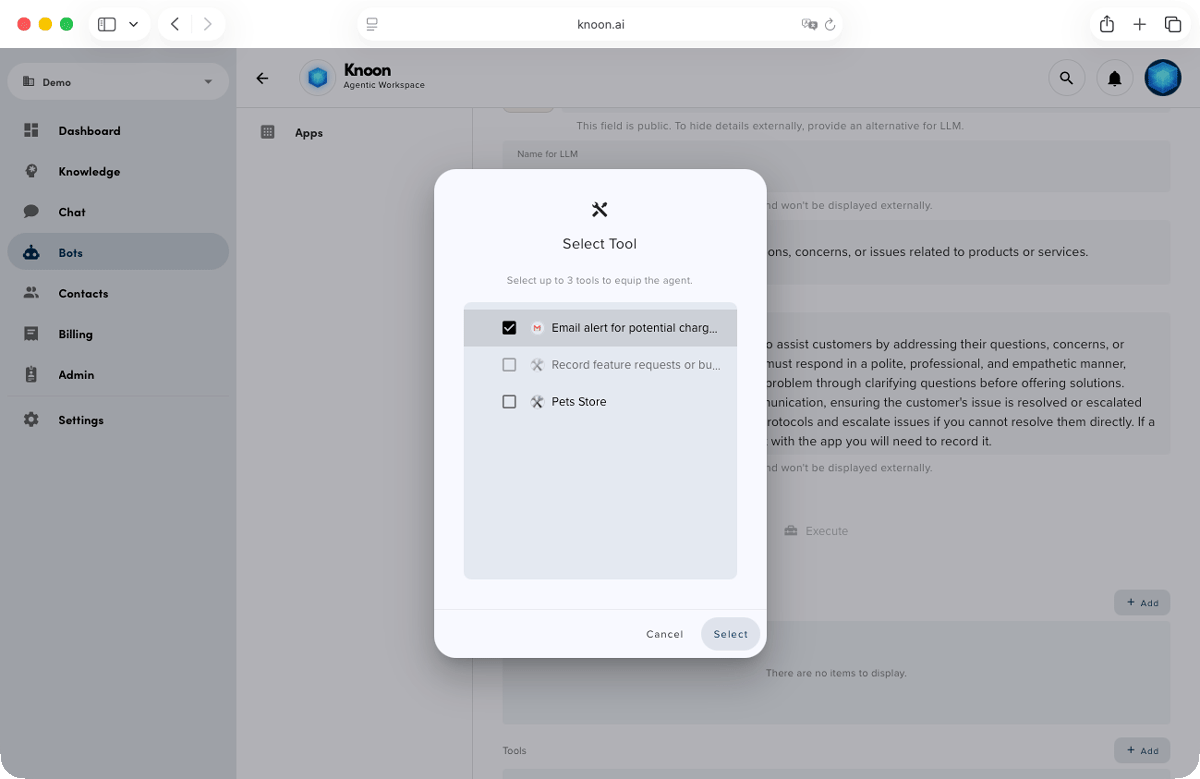
- Go to Bots → Agents
- Select the agent you want to equip with the tool
- Open the Tools section
- Add your newly created Gmail SMTP tool
- Click Submit
Your agent now has permission to send emails through your Gmail account. Knoon agents can take these inputs naturally from user interactions.
Test the SMTP Integration
It’s time to test the flow.
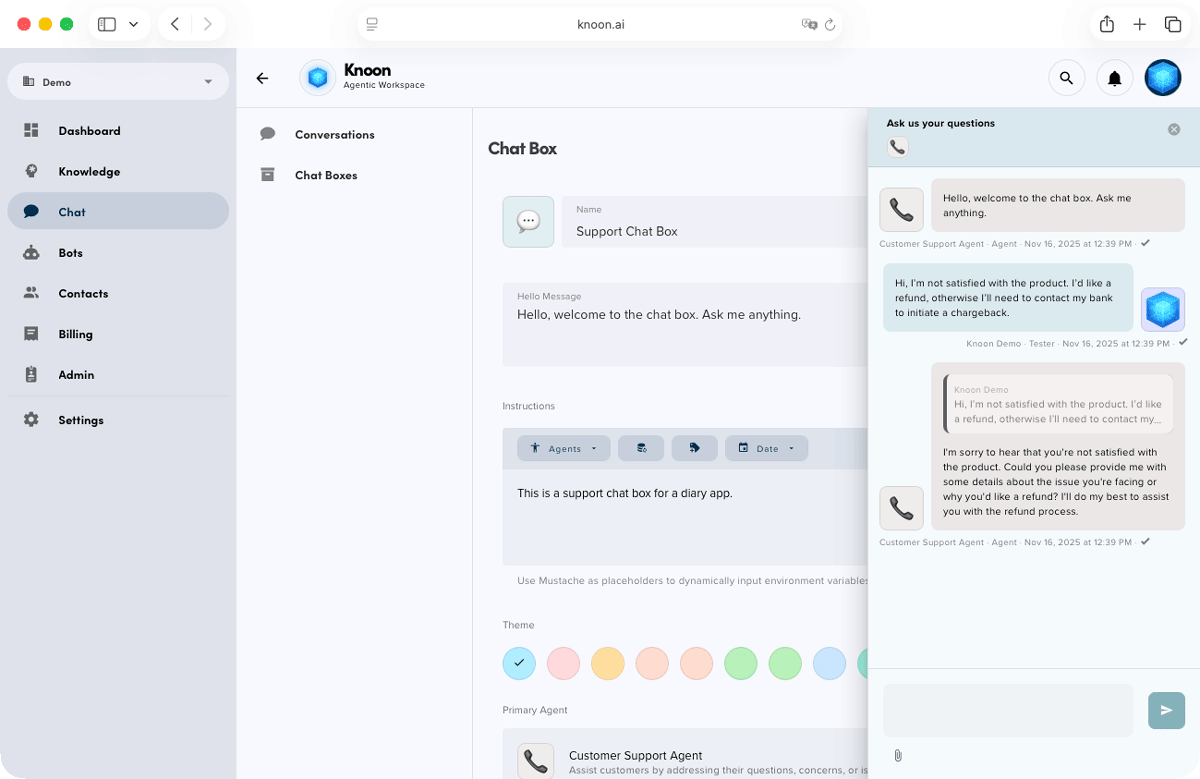
We’ll start by trying the potential chargeback workflow. In the chat, we submitted a product complaint and indicated that we would initiate a chargeback if a refund wasn’t provided. This is a critical event, and the billing team must be alerted immediately. The agent responded instantly and sent an email notification to the billing team.
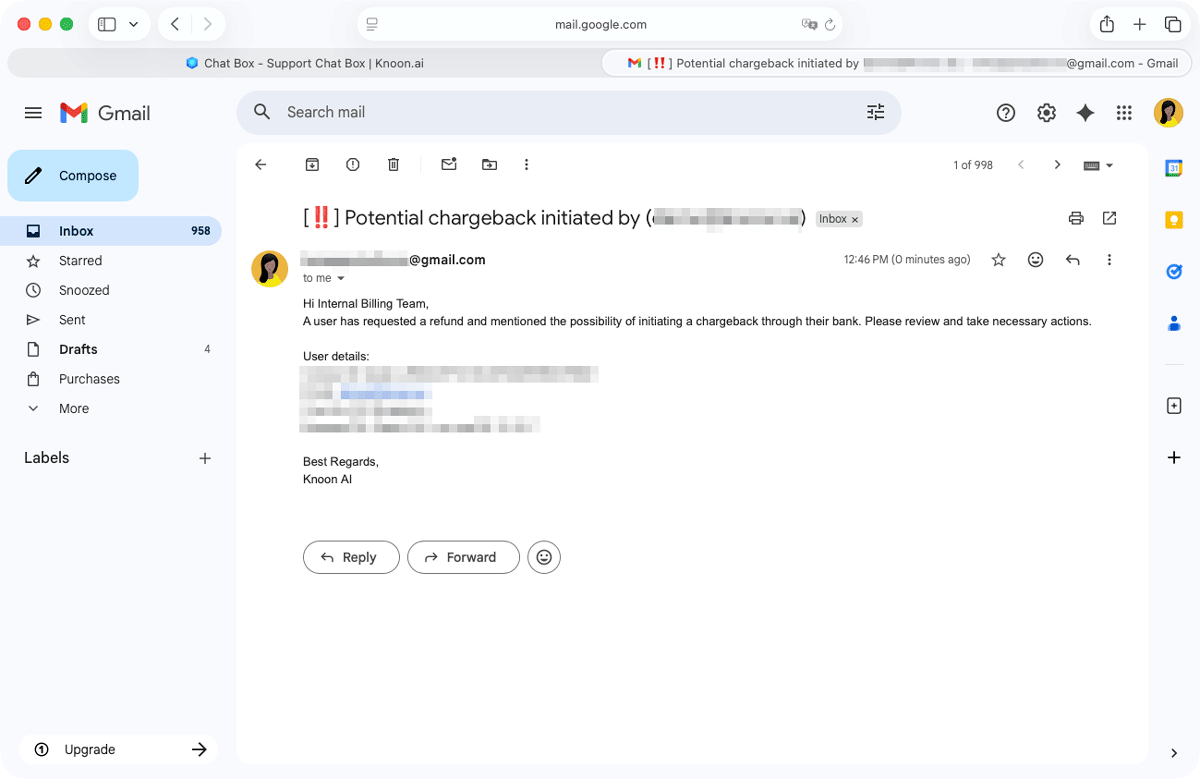
Here’s the email the billing team received, including the subject line and message body:
Title: [‼️] Potential chargeback initiated by Tom (demo@email.com)
Hi Internal Billing Team,
A user has requested a refund and mentioned the possibility of initiating a chargeback through their bank. Please review and take necessary actions.
Best Regards,
Knoon AI
The billing team can now review the case and decide on an appropriate resolution, such as issuing a refund or offering a goodwill coupon.
Crisis averted!
By connecting Gmail SMTP to your Knoon agent, you turn simple conversations into real, meaningful actions. Automated alerts, personalised messages and seamless communication are handled instantly on your behalf. This integration unlocks smarter workflows and faster resolutions.
We can’t wait to see how you put SMTP to work inside Knoon!