

What Are AI Agent Tools? A Complete Guide to How Agents Take Real Actions

Imagine this. A customer asks “Can you check where my order is?” Behind the scenes your AI agent immediately gets to work. It identifies the customer by email, pulls up the latest purchase, checks the fulfilment status and responds “Your order has shipped. Tracking number 123456789.”
All of this happens instantly without any human involvement. AI agents have moved far beyond simple chatbots. They do more than “talk”. They take action, complete tasks, fetch data, trigger workflows and integrate with your business systems in real time.
How do they do all of that? The secret lies in AI agent tools.
Tools act as the bridges that connect an agent to your data, your backend and your operational ecosystem. They are what empower an agent from a conversational assistant into a capable digital worker.
In this article we will explore what AI agent tools are, why they matter, examples of how they work in practice and how platforms like Knoon use tools to power true agentic automation.
What Are AI Agent Tools?
AI agent tools are predefined actions or interfaces that allow an agent to interact with external systems.
Think of tools as permissions and instructions that enable the agent to:
- Retrieve or update data
- Trigger workflows
- Call APIs
- Execute tasks
- Perform operations normally handled by humans
Without tools, an AI agent can only produce text. With tools, it can do actual work.
An agent with tools can:
- Check an order status
- Create a ticket
- Send an email
- Add a row to Google Sheets
- Update CRM information
- Trigger a refund review
- Route to specialised agents
That’s the difference between a chat interface and a digital teammate.
Examples of Popular AI Agent Tools
Here are common categories of tools across businesses:
Communication
- Send emails (SMTP, Gmail)
- Send Slack messages
- Trigger notifications
Data Layer
- Read/write rows in Google Sheets
- Read/write in Google Docs
- Query databases
- Fetch user profiles from CRM
E-commerce
- Check inventory
- Create draft orders
- Update order notes
- Retrieve fulfilment status
- Shopify API tools
- Stripe subscription lookup
Operations
- Create tickets
- Add notes to systems
- Trigger workflows
- Knowledge base search
Internal Tools
- Custom API actions (OpenAPI/Swagger)
- Internal scripts
- Business logic microservices
How to Create and Equip Agents With Tools in Knoon
Follow these steps to give your agents real action-taking abilities inside Knoon.
Create a Tool in Knoon
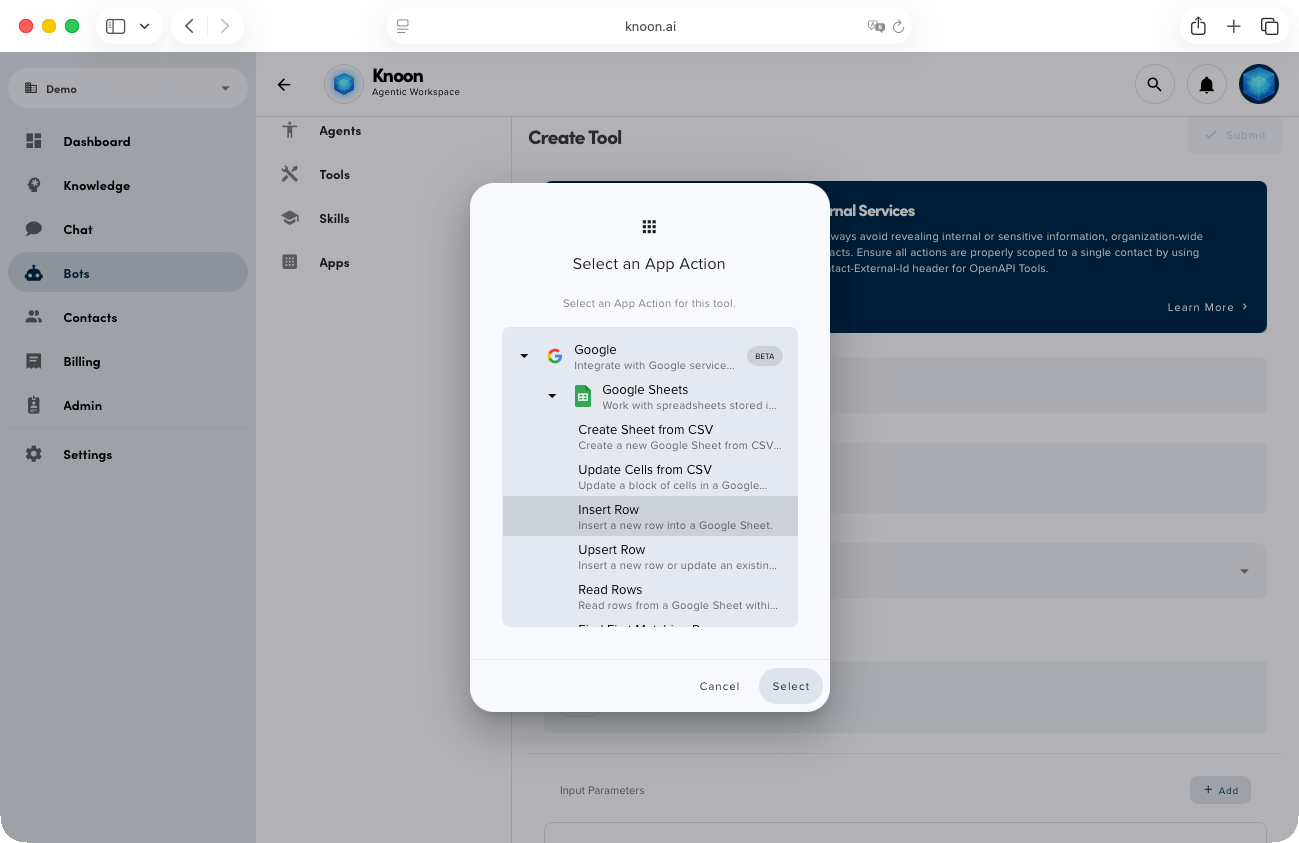
- Open Knoon.
- Go to Bots → Tools.
- Click Create.
- Enter the name and description of your tool.
- (Optional) Enable Provide alternative description to LLM if you want to give clearer instructions to the agent.
- Choose the Type of tool.
- Use App for Google Sheets, Gmail SMTP and other built-in app actions.
- Use OpenAPI to connect your own backend or Swagger API.
- Configure the tool inputs. These are the values the agent will collect from the conversation.
- Configure the output or action details (for example the range for Sheets, email fields for SMTP or schema for OpenAPI).
- Click Submit to save the tool.
Your tool is now ready to be used by any agent in your workspace.
Equip an Agent With the Tool
- Go to Bots → Agents.
- Select an agent.
- Scroll to the Tools section.
- Choose the tool you created from the dropdown list.
- Press Submit to save the agent.
Your agent can now call the tool automatically during conversations. It will collect the required parameters from the user, trigger the tool at the right moment and use the result to continue the conversation intelligently.
AI agents are powerful, but tools are what make them useful.
Tools turn conversations into action, ideas into tasks, and support into real operations.
Whether you’re integrating Google Sheets, Shopify, Gmail SMTP, or your own API, tools give your agents the ability to work like a real digital teammate.
And with platforms like Knoon making tool creation simple and safe, the future of agentic automation is already here.