

Human-in-the-Loop vs Human-on-the-Loop in AI Workflows

AI systems help teams move faster, but speed can come with risk. Two common ways teams add human oversight are human-in-the-loop (HITL) and human-on-the-loop (HOTL). This article explains both in plain language, shows real examples, and gives a practical checklist to help product and ops teams pick the right model.
What Is Human-In-The-Loop (HITL)?
Human-in-the-loop means a human is part of the decision path. The AI flags or suggests something, and a person must review, approve, or change it before the system proceeds. HITL slows things down a bit, but it lowers the chance of costly mistakes.
Examples:
- A lawyer reviews and signs contract edits suggested by an AI.
- A radiologist confirms a scan result before it becomes a diagnosis.
- Moderators review content that an AI marked as risky.
When a wrong decision could cause legal problems, safety issues, or big financial loss.
Use Human-In-The-Loop when:
- Errors can cause harm, legal exposure, or big financial loss.
- The task needs specialized judgment that AI cannot reliably provide.
- Regulation requires human sign-off.
Common Human-In-The-Loop use cases:
- Medical diagnosis assistance
- Contract negotiation and legal review
- High-value financial transactions
What Is Human-On-The-Loop (HOTL)?
Human-on-the-loop means humans monitor what the AI does but are not required to approve every decision. The system runs automatically most of the time. Humans watch dashboards, sample outputs, or get alerts for unusual cases.
Examples:
- An automated recommender system serves content at scale while product owners audit samples.
- Fraud detection that automatically blocks low-risk cases but alerts humans about high-risk patterns.
When you need speed and scale, and risk can be handled by monitoring, audits, or escalation rules.
Use Human-On-The-Loop when:
- You must process large volumes quickly.
- Decisions are lower risk or can be reversed.
- You have strong monitoring and escalation systems.
Common Human-On-The-Loop use cases:
- Large-scale personalization and recommendations
- Automated customer replies with sampling audits
- Telemetry-driven fraud detection with human escalations
Key Differences At A Glance
| Factor | Human-in-the-loop | Human-on-the-loop |
|---|---|---|
| Control | Human decides before action | Human monitors, can intervene |
| Speed | Slower, higher latency | Fast, designed for scale |
| Cost | Higher ongoing cost (reviewers) | Lower per-action cost, higher tool cost for monitoring |
| Best for | High-stakes decisions | High-volume, low-to-medium risk tasks |
Knoon's Human-In-The-Loop Agentic System
Knoon enables human in the loop directly inside each Work Box so teams can decide where human judgment is required. At any step in a workflow you can require a human to review approve or edit before agents continue. This can include approving a draft checking data or signing off on a high risk action.
Work Boxes show agent reasoning and proposed outputs clearly in one place so operators can step in without stopping the workflow. This helps teams work faster with AI while keeping people in control when accuracy compliance and trust matter most.
How to Enable Human-In-The-Loop in Knoon's AI Work Box
To enable Human-In-The-Loop, open the Work Box settings and check the Human-In-The-Loop option.
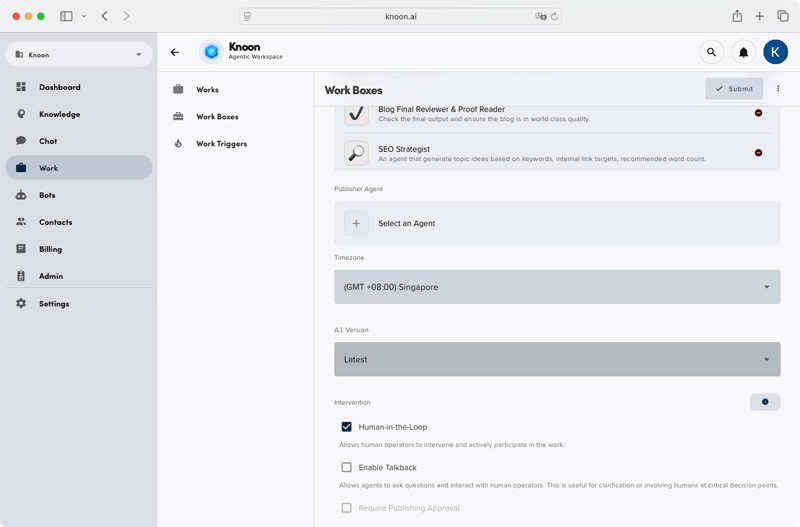
When this is enabled and you start a new Work Box run, Knoon will pause at each decision point and prompt you for input. Agents will wait for your review, approval, or changes before continuing, ensuring that every important decision includes human oversight.
Picking the right balance is not a one-time decision. Teams will tune thresholds, add automation, and shift human roles as they learn from data. The goal is the same: get the speed and productivity of AI while keeping people in control when it matters most.