

Build Your Custom Auto-Reply to Google Play Store & App Store Reviews with AI Using Knoon in 5 Minutes
Customer reviews are one of the strongest signals of trust for any app. They influence downloads, shape your brand’s reputation, and provide invaluable feedback straight from real users. Yet keeping up with reviews across Google Play and the App Store is not easy. It takes time, and too often replies end up delayed, inconsistent, or missed altogether.
That is why we are excited to show you how Knoon’s multi-agent AI can help you manage and reply to reviews more effectively. By tapping into Knoon’s knowledge base and AI tools, you can generate accurate and personalized responses while also uncovering deeper insights about your customers. With Knoon, you can stay responsive, professional, and genuinely human, without adding more work to your team. In this article, we will show you how to set up this workflow in less than five minutes.
The Problem with Managing App Reviews Today
Managing reviews today is still a very manual and tiring job. Replies are often slow or not consistent. Sometimes teams copy and paste template replies that do not really match what the user is saying. When teams are busy, many reviews are left without any reply.
Reporting is not much better. Many teams still download reviews by hand, copy them into spreadsheets, tag them one by one, and try to look for trends once a month. This whole process is slow and easy to make mistakes, and it often means teams miss important problems and useful feedback from users.
Knoon Turns App Reviews into Actionable Work
Knoon is an AI platform that helps teams do real work, not just automate small steps or write text. For app reviews, Knoon treats feedback as a simple workflow instead of a big list of messages that people have to handle by hand.
Knoon brings your Google Play and Apple App Store reviews into one place. It gets new reviews automatically, uses AI to understand them, and groups them by what they are about, like praise, bugs, feature requests, billing problems, or support questions. When it writes replies, Knoon can also use your company’s knowledge base to give clearer and more accurate answers that match your product and rules. If a review is important or sensitive, it can send it to your team to handle.
Knoon also turns all this feedback into easy-to-read reports. These reports show trends, repeated problems, and chances to improve, so your team does not need to read through endless comments.
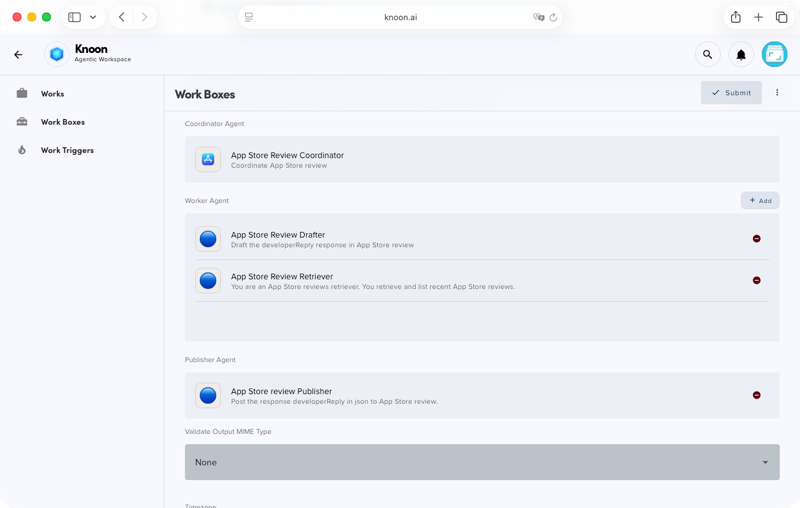
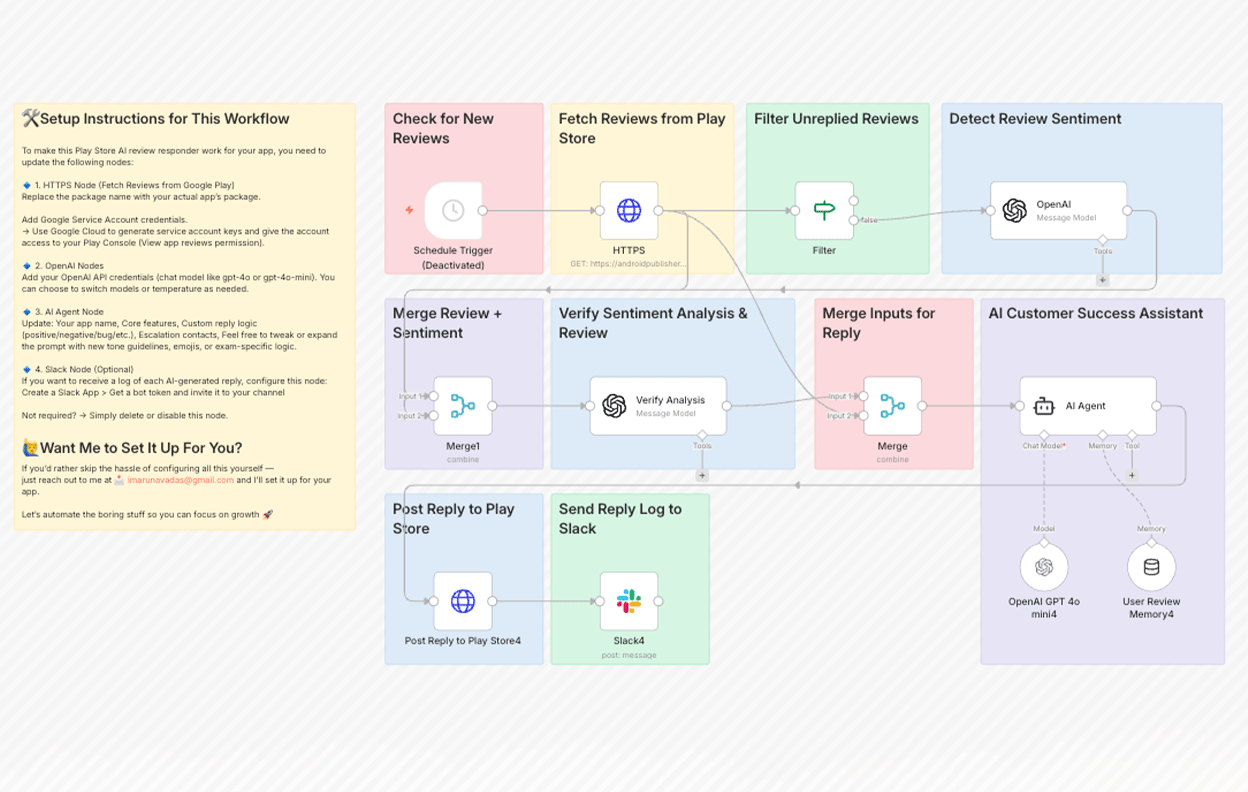
Setting up a workflow in Knoon (left) is easy and takes less than 5 minutes. In comparison, a similar workflow in n8n (right) is more complicated and harder to customize.
Compared to building complex workflows in tools like N8N, Knoon is much simpler to set up and run. You do not need to spend time fixing or maintaining complicated flows. You can focus on giving better replies, getting better insights, and building better products.
How to Create Agents for App Review in Knoon
In Knoon, you can manage app reviews by splitting the work into a few simple agents. Each agent has one job. Together, they help you get reviews, write replies, and publish them.
First, you need to create two tools:
- A tool to retrieve recent app reviews
- A tool to publish review replies to the App Store and Google Play
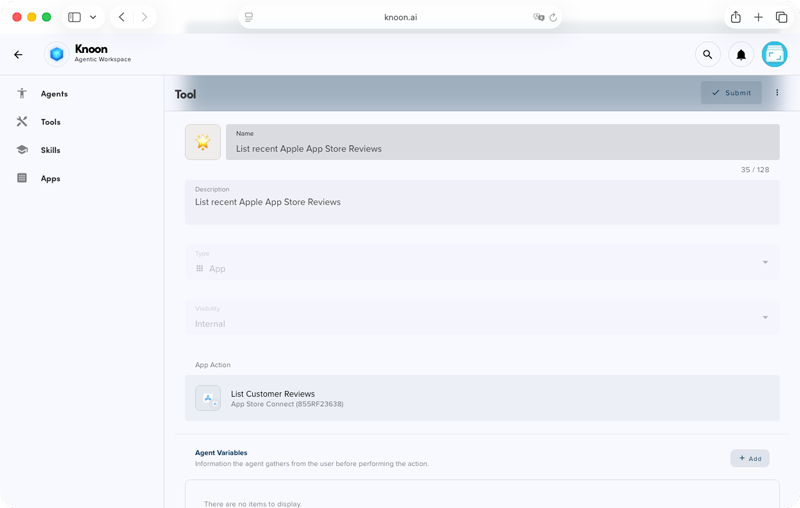
In the example below, we will show the setup for the App Store. The steps for the Google Play Store are very similar.
Tool to Retrieve Recent App Reviews
- Go to Knoon > Bots > Tools
- Press the Create button
- In the description, add "List recent Apple App Store Reviews"
- In the App Action, click on App Store Connect > List Customer Reviews
- In the appID field, insert your App ID.
- Press Submit to save changes.
Tool to Publish Review Replies to the App Store
- Go to Knoon > Bots > Tools
- Press the Create button
- In the description, add "Post to a Response to an App Store Review"
- In the App Action, click on App Store Connect > Create or Update Reply
- Create 2 agent variables:
Name: reviewID
Description: An unique ID of a Google Play review
Name: developerResponse
Description: Developer response to an App Store review - In the reviewId field, use reviewID. In the responseBody field, use developerResponse.
- Press Submit to save changes.
Now that the tools are set up, we can move on to creating the agents and equipping them with these tools.
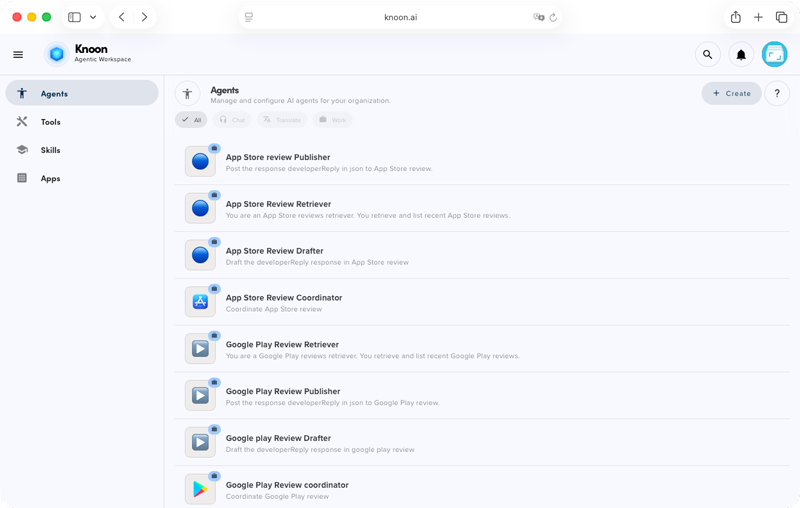
A basic setup uses four agents:
1. Coordinating Agent (The Manager)
- Starts the workflow
- Decides what happens next
- Sends tasks to other agents
- Chooses which reviews can be auto-replied
Example prompt: You are an orchestration assistant for replying to <App Name> App Store reviews. Loop through recent reviews from the retriever. For each unreplied review, send the reviewID to the Drafter to generate a polite, professional reply in JSON (developerReply), then pass it to the Publisher to post. Make sure each review is replied to only once and skip reviews that already have a published reply.
2. Retrieve Review Agent (Get the Reviews)
- Connects to Google Play and the App Store
- Pulls new reviews
- Skips reviews that already have replies
- Sends only new or pending reviews to the Coordinating Agent
Example prompt: You are an App Store review retriever. Your task is to fetch and list recent App Store reviews.
3. Drafting Agent (Write the Reply)
- Reads and understands each review
- Figures out what the review is about, like praise, bug, or question
- Uses Knoon’s knowledge base to find the right info
- Writes a clear, helpful reply in your brand tone
Example prompt: Draft polite, friendly, and professional replies to Journey App Store reviews based on the star rating (1–5). Greet the user by name, keep the reply concise. Do not use em dashes and do not end with a signature. Save each reply in JSON with reviewID and developerReply. Always output in JSON and limit each reply to 10,240 characters.
4. Publish Agent (Send the Reply)
- Takes the final reply text
- Posts it to Google Play or the App Store
- Confirms the reply is posted
- Sends the result back for records and reports
Example prompt: Publish the developerReply contained in the JSON to the corresponding App Store review.
Once you’ve set up the agents and tools, add them to a Work Box.
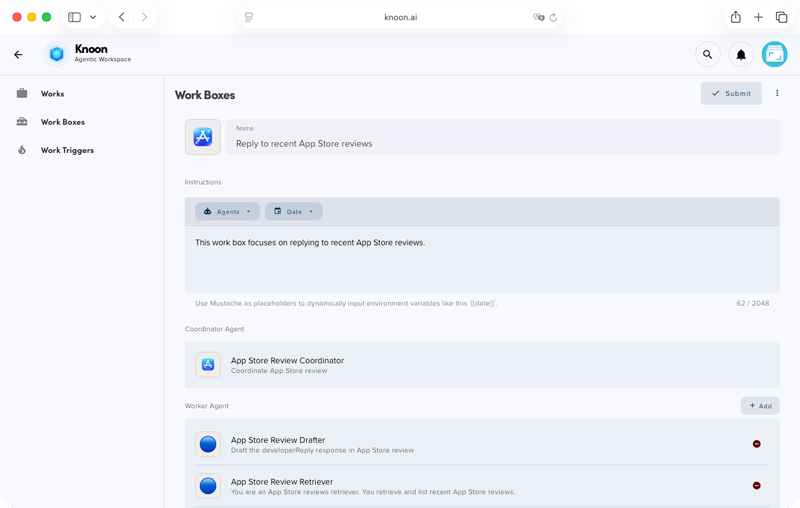
- Go to Work > Work Boxes > Create.
- In the instructions, add: “This Work Box focuses on replying to recent App Store reviews.”
- Then add the coordinating agent (Coordinating Agent), the worker agent (Retrieve Review Agent and Drafting Agent), and finally the publisher agent (Publish Agent).
- If you want to review replies before they’re published, enable talkback and require publishing approval.
- Press Submit to save changes.
You’re all set!
Go to Work > Works, click Start, and select the App Review Work Box. Then type start to begin.
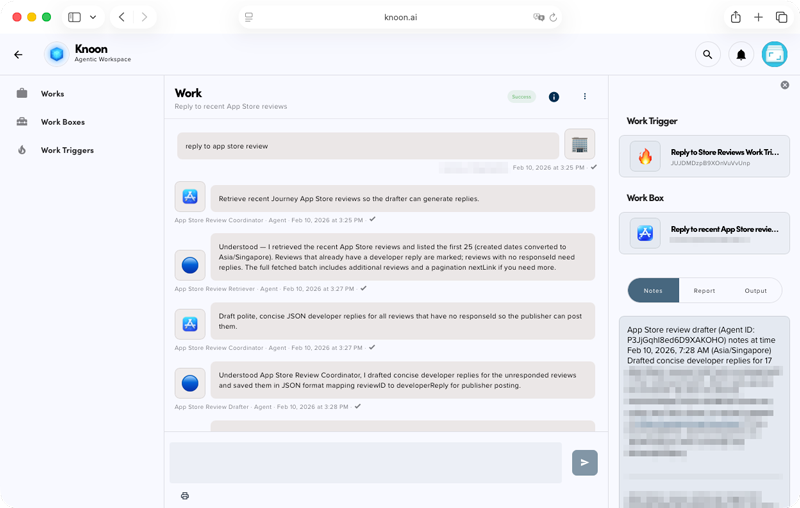
The coordinating agent should first assign the retriever, then the drafter, and finally the publisher to post the replies to the App Store.
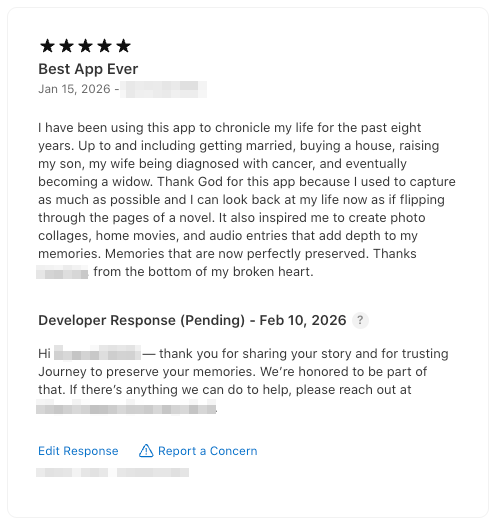
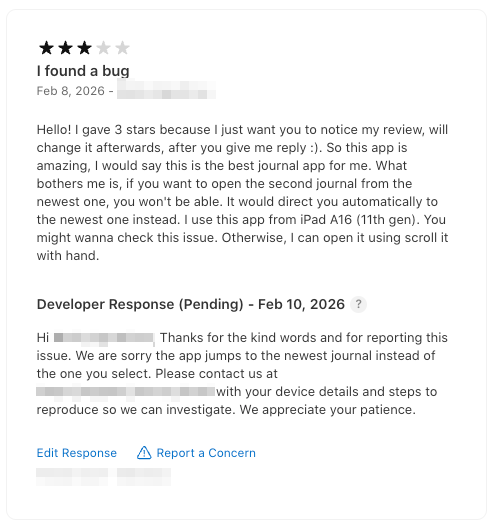
Here are some example replies written by Knoon’s agents, from 5-star reviews to critical 3-star reviews.
You can further extend the workflow by sending critical reviews to your email for notification or compiling them in Google Sheets or Microsoft Excel.
With Knoon, you can turn reviews into a simple workflow. It gets new reviews, writes replies, and publishes them. You can also choose to review replies before they go out. Your team can reply faster. Your replies stay consistent. No review is missed.
Knoon does more than just reply to reviews. It helps you organize feedback and see common problems. This helps you improve your app and your user experience. Your team does not need to copy and paste anymore. You can spend more time building better features and helping users.
Set it up once. Press start.
Let Knoon do the busy work while your team focuses on what matters.