

Build Smart Web AI Agents in Minutes Without LangGraph or FastAPI

Building smart web AI agents with orchestration usually requires a significant amount of infrastructure and engineering work. In the article Building Smart Web AI Agents with MCP, LangGraph and FastAPI, the author shows how to build an AI agent system using a Python stack with FastAPI for APIs, LangGraph for orchestration, and MCP for tool integration. It is an example of how modern agent systems are built, but it also highlights how much time and code are needed just to get a basic agent running and keep it maintainable.
That is exactly what we want to change. With Knoon, you do not need to build or maintain this kind of backend stack. Knoon handles orchestration, tool integration, memory, and execution for you, so you can focus on what your agent should do instead of how to build the infrastructure around it.
Build a Smart Web AI Agent Without Knoon
To build smart web AI agents with a traditional backend stack, you usually need to set up LangGraph and FastAPI, which requires you to:
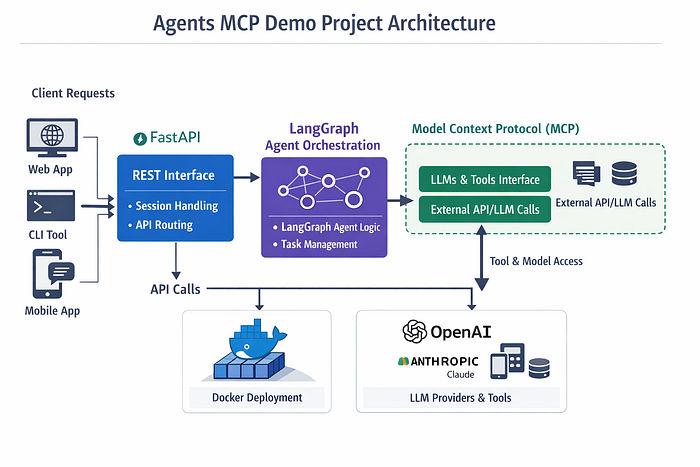
- Design the agent graph and state transitions
- Implement API endpoints to receive and return requests
- Build or host tool adapters through MCP or custom integrations
- Add logging, monitoring, and debugging for agent runs
- Handle memory, session state, and human-in-the-loop steps
- Deploy and operate the entire stack
With Knoon, these features are built into the platform. You do not write orchestration code or manage servers. You configure agents, select tools, and define workflows. The platform takes care of execution, reasoning loops, and coordination between steps.
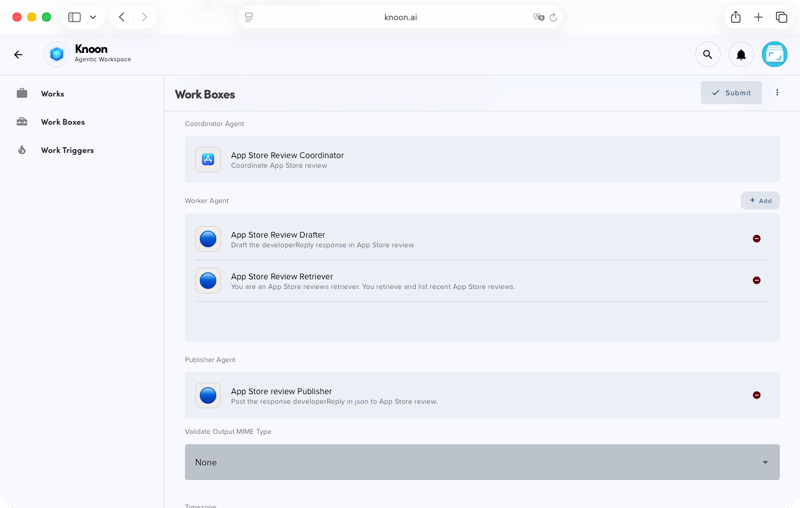
This means the same class of intelligent, multi-step agents can be built in a fraction of the time, with far less operational overhead!
A Simpler Way to Build Smart Web AI Agents With Knoon
Building an agent in Knoon typically looks like this:
- Choose the tools your agent should use, such as Stripe, QuickBooks, Google Sheets, or custom APIs.
- Define the agent’s role in plain natural language, for example, “Use a customer’s email address to find their account and check subscription status.”
- Place the agent into a workflow, also called a Work Box, which can be triggered manually, on a schedule, or by an event.
- Run and test the workflow. Knoon orchestration handles planning, tool selection, execution, and continuation.
There is no need to set up a web server, write orchestration logic, or manage integrations at the code level.
|
Capability |
MCP + LangGraph + FastAPI |
Knoon |
|---|---|---|
|
API entry point |
Custom FastAPI service |
Built-in Knoon API |
|
Agent orchestration |
Explicit graph logic with LangGraph |
Built-in agent orchestration engine |
|
Tool integration |
MCP servers or custom adapters |
Built-in connectors and tool plugins |
|
Workflow control |
Programmatic graph and state management |
Declarative workflows and Work Boxes |
|
Memory and state |
Implemented in code |
Managed by the Knoon runtime |
|
Observability and telemetry |
Custom implementation |
Built-in |
|
Deployment |
Self-hosted infrastructure |
Fully managed by Knoon |
|
Time to first working agent |
Hours to days |
Minutes |
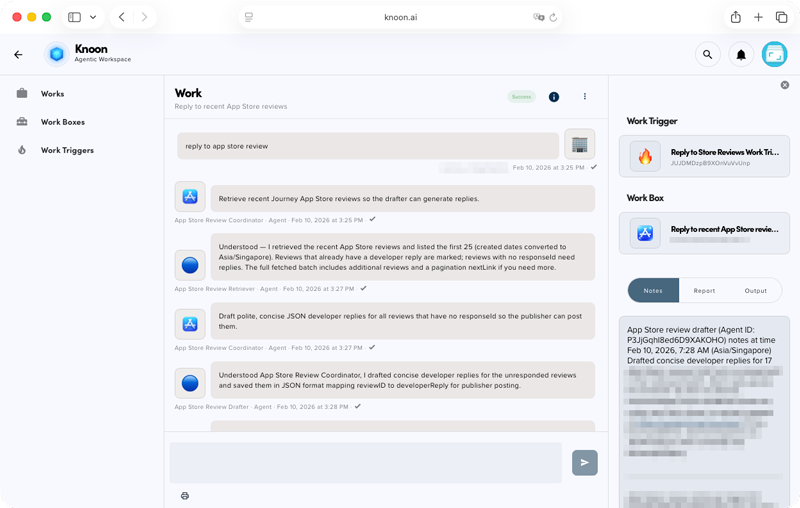
Using this approach, teams can quickly build agents in minutes for tasks such as:
- Checking customer subscription or billing status
- Monitoring failed payments and sending alerts
- Generating financial summaries and reports
- Booking appointments in Outlook calendar
- Answering support questions using live system data
- Syncing data between systems and triggering follow-up actions
Frameworks like LangGraph, FastAPI, and MCP are useful for understanding how agent systems can be built from scratch. However, they require significant engineering effort to implement, operate, and maintain.
Knoon applies the same architectural ideas in a managed platform. Instead of building the stack, you focus on defining what your agents should do and how they fit into your workflows. This allows you to go from idea to a working smart web AI agent in minutes, without the complexity of running your own backend infrastructure.
Create your first AI agent today with Knoon, no hassle required.